Codex, OpenClaw - 2026 年初对 AI 工具的整理
这篇文章也按照惯例把闲聊放到前面,可能比起实现细节,想法更直观一些。
起初切到 Codex 的契机是通过美国家宽 IP 的 relay 高强度使用 Claude Code 两个月后,有几次不小心漏了香港 IP,账号果然很快就被 ban 了,而且账号的订阅费没拿回来,有些恼火。并且出于安全考虑(也有担心被偷换模型),也没有使用中转站。恰逢当时 Codex 发布不久,风评也很不错,而且 OpenAI 对比 Anthropic 在谁能用(IP,公司...),怎么用(开源套壳工具)这些方面就慷慨多了(这些是后续慢慢发现的),目前订阅也从 Plus 升级到 Pro 有 4 个月了(已经分不清自己和 AI 谁在为谁打工了)。
写这篇文章的时候 OpenClaw 已经发布 3 个月,我也玩了一段时间,为了不泄露敏感信息,我把闲置的 macbook 还原,专门给 OpenClaw 腾出来,接到了 Telegram,token 方面还是使用的 OpenAI 订阅,直接 OAuth 鉴权,token 管够,在手机上玩起来还是挺爽的。
不过 OpenClaw 对我而言有两个小问题。
第一是把开发环境、仓库同步到这个闲置 mac 还是比较麻烦的,个人感觉比较理想的场景是离开常用的开发 mac 之后,手机上可以无缝接管。而因为 OpenClaw 的权限太大了,所以暂时不太放心把他接到常用的 mac 上。相比之下,我目前更放心使用 Codex,而且已经完全 YOLO 了,这么做的底气大概有几个原因:
- YOLO 前有大量 Approve 过 Codex 的请求,心里大概有概念 Prompt 会相应执行什么动作,并且有过一段时间守着 YOLO 的 Codex 工作。
- 安装 SKILL 很克制,安装前会自己 review。
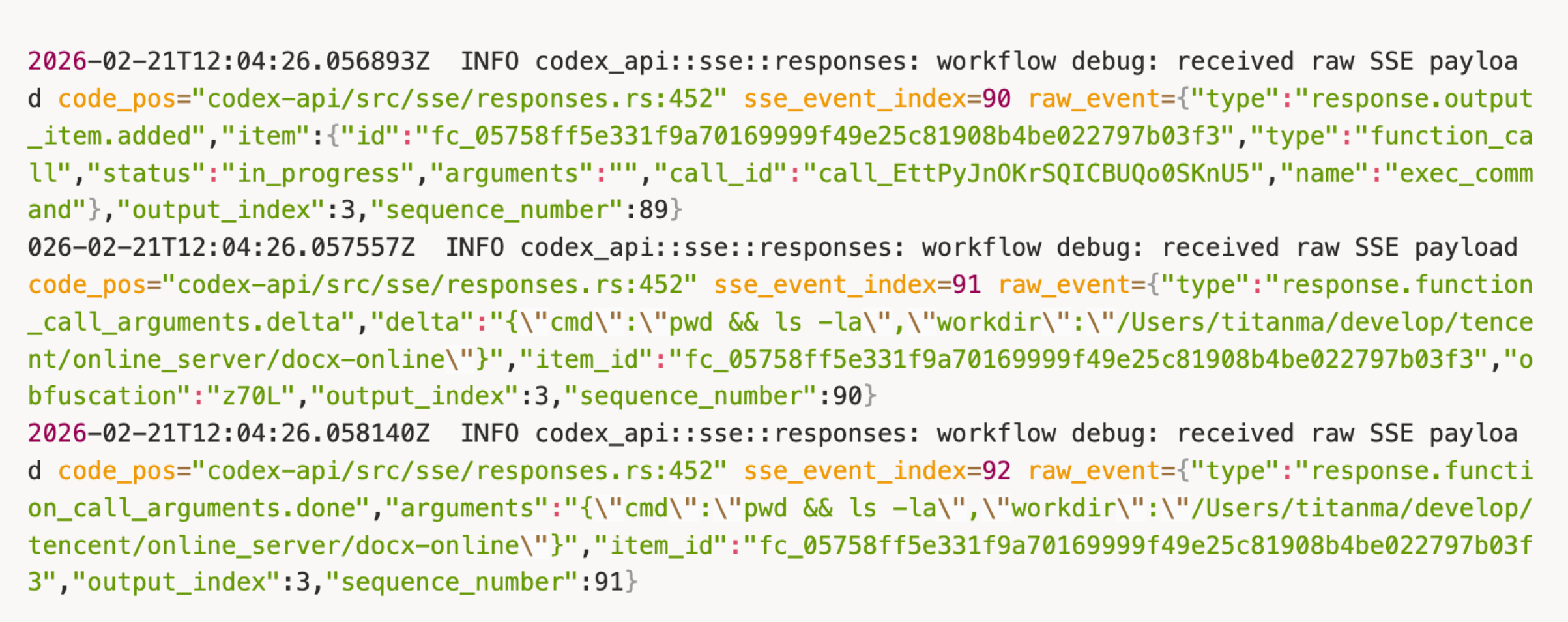
- 有手动编译过 Codex 的实现,打大量的 log 结合代码确认工作流。

- 在 Codex instructions 级别 (从 AGENTS.md 读) 做了安全防护,比如禁止他使用
rm,强制使用trash,(事实上已经把 shell 环境里的rm干掉了)。并且禁止他使用mv,cp,rsync之类的工具使用覆盖的方式误删文件。
第二个问题是 OpenClaw 的代码能力不是原生的,依赖 @mariozechner/pi-coding-agent 和内部的一些集成。而 Codex 的代码能力是一等实现,而且维护方向更聚焦代码能力,我的主要需求就是代码能力,这方面 codex 更理想一些。
因此需求还是比较清晰的:
- 希望 Codex 能够像 OpenClaw 一样能够和聊天工具集成,接收 Prompt 和返回结果。
- 能够把日常使用 Codex cli 的 Prompt 结果 relay 到聊天工具。
- 不同的 Chat Group 能够多开 Codex 实例。
做这种扩展并不难,codex 原生已经提供了 codex-app-server 通过 JSON RPC 协议 (opens in a new tab) 暴露对内部 codex-core 流程的访问,codex-cli 也是使用的同一套 codex-core,所以只需桥接 TG 的 Bot API 和 codex-app-server 的 JSON RPC 协议就可以了
写这篇文的时候,Claude Code 发了远程控制 (opens in a new tab),可以把本地的 Claude 对话桥接到 IOS/Android app/Web 端用,可能 Codex 很快也会跟上了。
在实现时,我直接把仓库 fork 了一份,因为外部贡献者 feature 级别的 PR 很难 Merge,并且估计不少开源团队被丢过来的 PR 折磨不轻,比如 Codex 现在 只接受通过 issue 讨论严格按照约定修改范围然后邀请的 MR (opens in a new tab)。
Code
实现放在 codex-rs/bridges (opens in a new tab),文档在 telegram_bridge.md (opens in a new tab)。
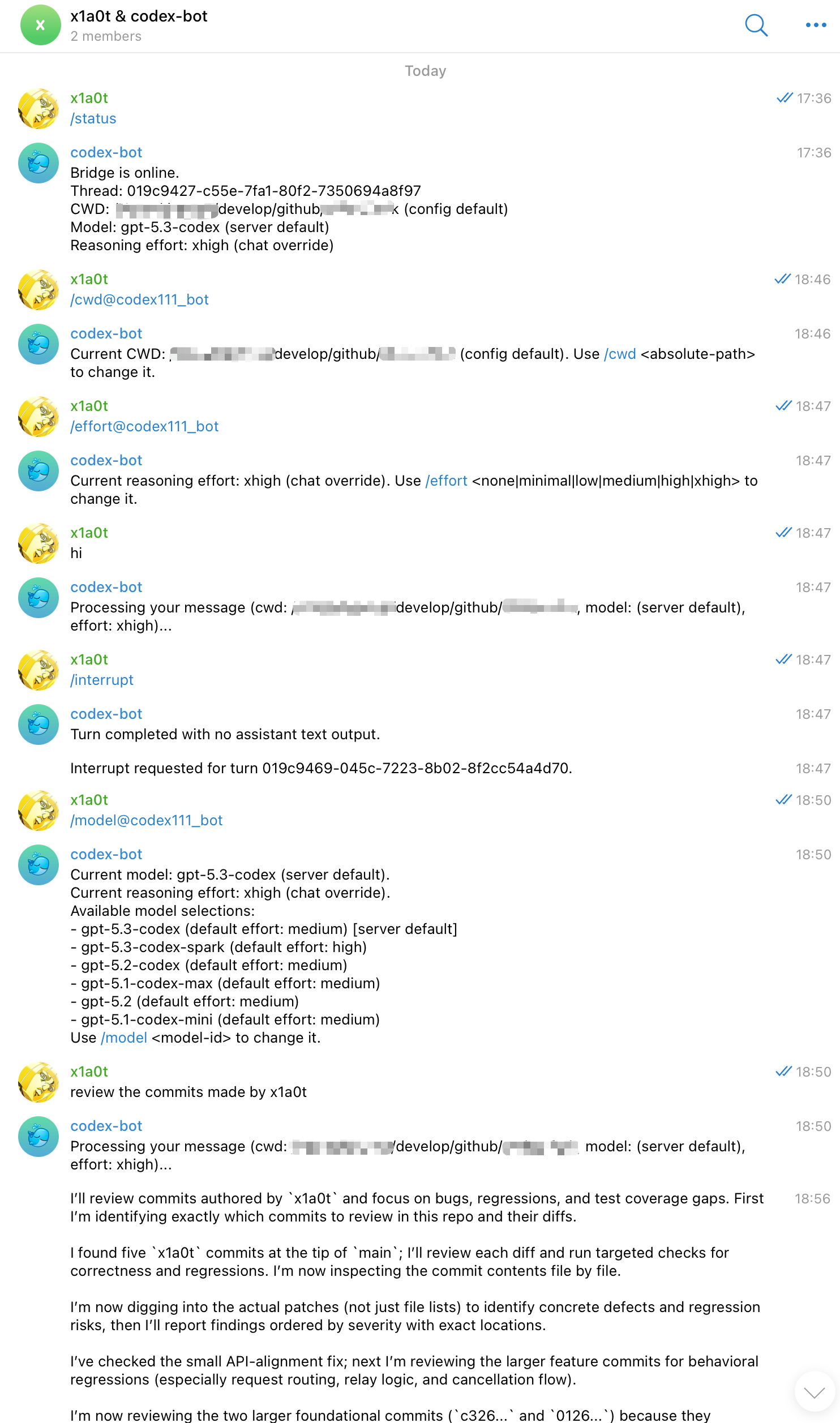
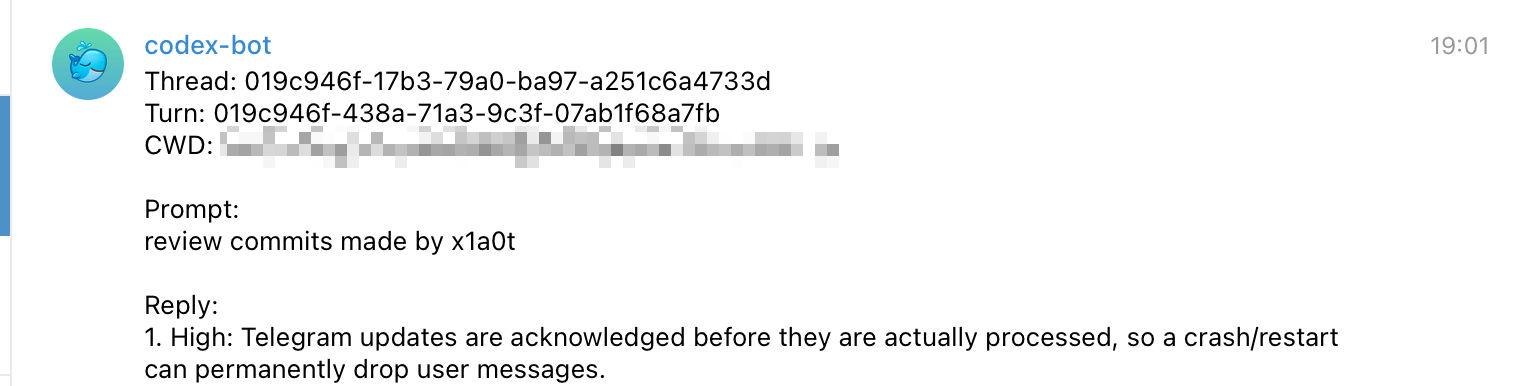
目前支持每个 Telegram ChatGroup 保存单独的配置(当前 codex thread_id, working directory, model, reasoning effort), 不同的 ChatGroup 输入 Prompt 不互相阻塞,并且可以分别使用指令 /interrupt 中断。手动编译 cargo build -p codex-cli --release 之后的 Codex CLI 如果环境变量配置 CODEX_TELEGRAM_REPLY_RELAY=true,所有的消息都会 relay 到 Telegram 配置的对应 ChatGroup。
快速启动
在 Telegram 创建 Bot,参考 配置文档 (opens in a new tab) 创建配置在 ${CODEX_HOME:-~/.codex}/telegram/config.toml。
# Telegram Bridge
cd codex-rs && cargo run -p codex-cli -- app-server --listen ws://127.0.0.1:4222 --telegram-bridge

# Codex CLI with Telegram Bridge Relay enabled
cd codex-rs && cargo run -p codex-cli --release
telegram 指令
- `/reset` from Telegram clears the mapped Codex thread for that chat.
- `/cwd <absolute-path>` sets a chat-scoped CWD override and resets that chat thread.
- `/cwd` shows the current effective CWD for the chat.
- `/cwd reset` clears the chat-scoped CWD override.
- `/model <model-id>` sets a chat-scoped model override.
- `/model` shows the current effective model for the chat and lists selectable model IDs.
- `/model reset` clears the chat-scoped model override.
- `/effort <none|minimal|low|medium|high|xhigh>` sets a chat-scoped reasoning effort override.
- `/effort` shows the current effective reasoning effort for the chat.
- `/effort reset` clears the chat-scoped reasoning effort override.
- `/interrupt` (aliases: `/stop`, `/cancel`) interrupts the currently running turn for the chat.
- `/status` shows bridge liveness, current mapped thread id, and effective CWD/model/reasoning effort for the chat (including resolved server defaults). If the chat has no mapped thread yet, `/status` creates one so a thread id is always returned.
最后的效果大概长这样:
Telegram Bridge
Codex CLI with Telegram Bridge Relay

2026.03.03 - 默认使用 Telegram sendMessageDraft (opens in a new tab) 流式输出。